
July 2nd, 2026
New
Improved
Fixed
May 30, 2026 Updates
New
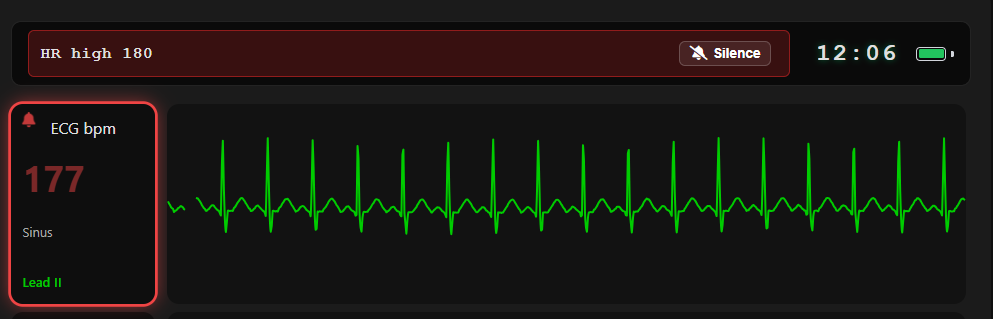
Patient Monitor Alarms
A full alarm system arrives on the student monitor, complete with an on-screen alarm bar, escalating alarm levels, and silence controls — bringing TMA in line with real-world bedside monitoring.
Event Log
Session activity is now captured in a running event log, giving instructors a clear record of what happened and when during a simulation.
Multi-Session Controller
One instructor, many sessions.
Session Selector: A tappable selector in the controller header opens a live overlay showing vitals and alarm states across every session you control.
At-a-Glance Alerts: If an unviewed session goes critical, the selector flashes the highest active alarm color.
Independent Sessions: Switching views never pauses a session — trends and timers keep running in the background.
Preloaded Scenarios
A new scenario dropdown loads complete vitals presets onto the controller in one click, with a guidance tooltip for each scenario — perfect for rapid scenario setup between student groups.
Advanced Session Controls
Expanded session management tools give instructors finer control over how sessions are created, joined, and run.
Feedback Portal
Have an idea or found a bug? Our new feedback portal is live at feedback.trainingmonitor.app — submit requests, vote on features, and follow our public roadmap.
Improved
Reset Session
"Reset to Default Vitals" is now Reset Session, with a confirmation modal to prevent accidental resets. One click restores all vitals to defaults, returns the rhythm to Sinus, clears BP history, and updates the monitor immediately.
Alarms Follow Visibility
When a vital is set to Not Visible, any alarm tied to it now hides as well — no more orphaned alarms for hidden parameters.
Rhythm ID Off = Truly Off
Turning Rhythm Identification off now removes the rhythm name entirely instead of blurring it.
Quality-of-Life Updates
QRS Beep now defaults to off for quieter session starts.
Session codes no longer use the easily-confused characters I or 1.
Narrow screens now display a recommendation to use a tablet or computer for the best controller experience.
Fixed
Waveform Redraw
Vital changes now update waveforms moving forward only — the trace already drawn on screen is never rewritten.
Display Off Silence
Toggling the Display Monitor off now hides the alarm bar and silences all alarm and QRS audio.
Polish Pass
Removed duplicate % from the SpCO label.
Resolved a glitch where a previous Heart Rate value persisted after updating.
Silence button text is now readable in light mode.
Header elements no longer overlap or cut off at certain widths.
Fixed container overlap in the battery menu.
Light and dark mode display spacing now match.
ECG dropdown heights standardized.
Added padding inside the Clear BP Hx button.